
How to Create an ATS Friendly Resume for Free in 2026?
Learn how to create an ATS-friendly resume for free in 2026. Explore resume formatting tips, Word templates, and career change resume strategies.
Prepico Editorial Team
Career Technology & ATS Research
Key Takeaways & Highlights
Learn how to create an ATS-friendly resume for free in 2026. Explore resume formatting tips, Word templates, and career change resume strategies.
Introduction
Creating a professional resume is one of the most important steps when applying for a job. However, having impressive qualifications and work experience does not always guarantee that your application will reach a recruiter. Many companies use Applicant Tracking Systems (ATS) to collect, organise, and screen resumes before recruiters review them. If your resume contains complicated formatting, missing keywords, or an unsuitable structure, important information may not be recognised correctly.
In 2026, understanding how to create an ATS-compatible resume has become essential for fresh graduates, experienced professionals, and individuals planning to change careers. An ATS-friendly resume presents your professional information in a clear, organised, and readable format. It helps recruitment software identify your qualifications, employment history, skills, and other relevant details.
The good news is that you do not need expensive software or professional design services to create a job-ready resume. With ats friendly resume templates word, you can prepare a structured resume that is easy to edit, customise, and share with employers. Choosing the right format and including relevant information can make your application more effective.
Platforms such as Prepico AI make the resume creation process more convenient by helping job seekers organise their information and create professional resumes. Whether you are applying for your first job, looking for a better opportunity, or returning to the workforce, a well-structured resume can help you communicate your professional value.
What Is an ATS-Friendly Resume and Why Does It Matter in 2026?
An ATS-friendly resume is a document designed to be easily processed by Applicant Tracking System software. Employers use these systems to manage job applications, organise candidate information, and support the recruitment process. Depending on the software and employer settings, resumes may also be evaluated against specific job requirements.
Unlike visually complicated resumes, ATS-compatible documents focus on readability, logical organisation, and relevant information. They generally use standard headings, simple fonts, and straightforward layouts that allow recruitment systems to identify important details.
For job seekers in India, ATS compatibility is particularly relevant when applying through company career pages, online job portals, and recruitment platforms. A properly structured resume makes it easier for recruiters to understand your professional background and determine whether your qualifications match the position.
However, ATS compatibility does not guarantee selection or an interview. Your qualifications, relevant experience, achievements, and suitability for the position remain important. The objective is to make your resume readable and relevant so that your skills and experience are communicated effectively.
How to Write an ATS Friendly Resume Step by Step
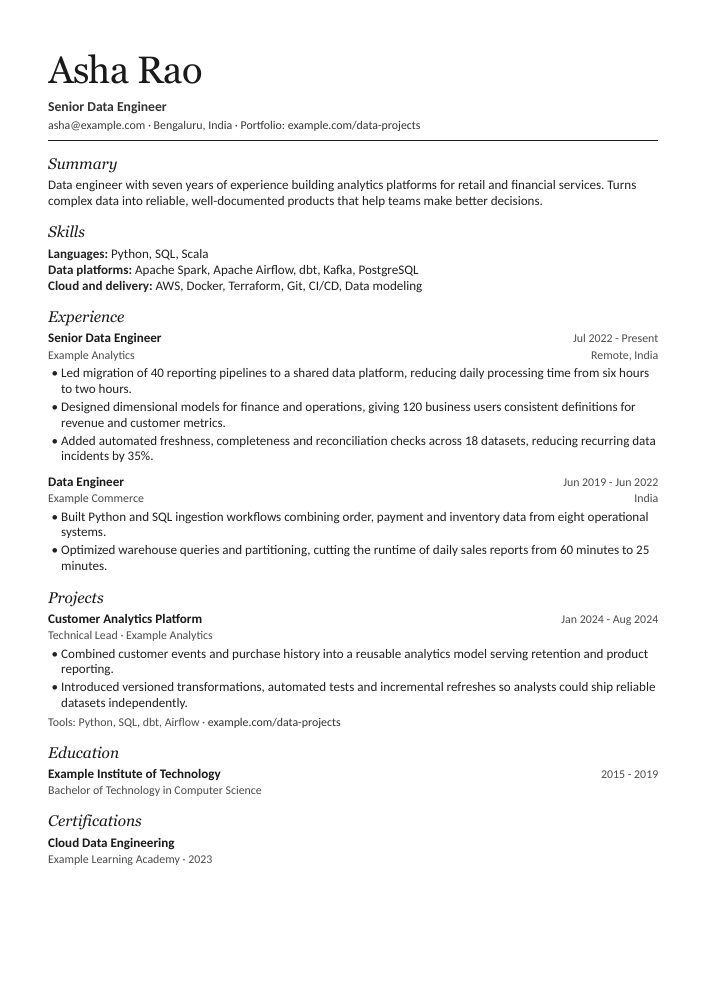
Understanding how to write an ats friendly resume starts with choosing a clean and professional structure. Your resume should communicate your professional background without unnecessary design elements or lengthy descriptions. Recruiters should be able to identify your experience, skills, and qualifications without searching through multiple sections.
Start with your contact information, including your full name, professional email address, phone number, and relevant professional profile link. Follow this with a short professional summary explaining your experience, expertise, and career objectives. Avoid adding unnecessary personal information that does not contribute to your application.
Your employment history should be presented in reverse chronological order, beginning with your most recent position. Include your job title, company name, employment dates, and responsibilities. Wherever possible, describe your achievements using measurable results, such as increased sales, reduced operational costs, improved customer satisfaction, or successfully completed projects.
Finally, include your educational qualifications, technical skills, certifications, and other relevant information. Use keywords naturally throughout your resume by referring to the skills and responsibilities mentioned in the job description. This approach helps communicate your suitability without unnecessarily repeating keywords.
Choose the Right ATS Friendly Resume Templates Word Format
Selecting an appropriate resume template can simplify the process of creating a professional application. ats friendly resume templates word are useful because Microsoft Word documents are easy to edit, customise, and save in commonly accepted formats. A simple template also helps maintain consistency across different sections.
When selecting a template, prioritise readability over decorative design. Avoid excessive graphics, multiple columns, complicated tables, text boxes, and unnecessary icons. These elements may sometimes create difficulties for ATS software when extracting information.
A single-column layout is generally a practical choice because it presents information in a straightforward reading order. Use consistent heading styles and professional fonts such as Arial, Calibri, or Times New Roman. Keep font sizes readable and maintain appropriate spacing between sections.
The following table explains the important features of an ATS-compatible resume template.
Resume Element
Recommended Format
Why It Matters
Layout
Single-column structure
Maintains a logical reading order
Font
Arial, Calibri or Times New Roman
Improves readability
Font Size
10–12 pt for body text
Keeps content readable
Headings
Standard section headings
Helps identify information
File Format
DOCX or text-based PDF
Supports document processing
Contact Details
Clearly written in the document body
Makes information accessible
Work Experience
Reverse chronological order
Highlights recent experience
Skills
Relevant job-related keywords
Communicates professional abilities
A suitable template should also provide enough space to explain your achievements without making the document unnecessarily lengthy. For most professionals, one or two pages are sufficient, depending on their experience and career history.
Essential Sections Every ATS-Friendly Resume Should Include
A complete resume should provide recruiters with a clear understanding of your professional background. Each section should have a specific purpose and contain information relevant to the position you are applying for.
The professional summary should briefly explain your experience, strongest skills, and career direction. It should be customised for the job rather than using the same generic introduction for every application. A relevant summary immediately communicates what you can contribute to an organisation.
The work experience section should highlight your responsibilities and achievements. Instead of writing lengthy paragraphs about everyday tasks, focus on meaningful contributions. For example, mention the number of projects completed, revenue generated, customers supported, or processes improved whenever accurate figures are available.
Your education, certifications, technical skills, and relevant projects should complete the resume. Fresh graduates can give additional attention to internships, academic projects, training, and practical skills. Experienced professionals should prioritise achievements and expertise that match the target position.
How to Create a Resume for Career Change ATS
Changing careers can be challenging because your previous job title may not directly match the position you want. However, your existing experience may include transferable skills that are valuable in a different industry. A well-structured resume for career change ats should highlight these relevant abilities instead of focusing exclusively on your previous designation.
Start by understanding the requirements of your target position. Identify the technical knowledge, communication abilities, leadership experience, problem-solving skills, and industry-specific competencies mentioned in the job description. Compare these requirements with your existing experience and identify areas of overlap.
For example, someone moving from customer service into sales may already have experience in client communication, relationship management, problem-solving, and customer retention. These skills can be presented in a way that demonstrates their relevance to sales responsibilities.
Your professional summary should clearly communicate your career transition and explain how your previous experience supports your new direction. Include relevant certifications, online courses, independent projects, and practical training where appropriate.
Most importantly, avoid copying keywords without having the actual skills or experience to support them. A career-change resume should be accurate, relevant, and focused on demonstrating your ability to perform in a new professional environment.
Common Resume Mistakes That Can Affect ATS Readability
Even a professionally written resume can contain formatting problems that make information difficult to extract. One common mistake is using complicated layouts with multiple columns, graphics, and decorative elements. Although these designs may look attractive, they can sometimes affect the reading order of resume content.
Another issue is using creative section headings instead of conventional labels. For example, headings such as Professional Experience, Education, Skills, and Certifications are easier for recruiters and many ATS platforms to recognise than unusual or decorative alternatives.
Keyword stuffing is another mistake to avoid. Repeating the same phrase excessively does not automatically improve your chances of selection. Instead, incorporate relevant terminology naturally into your professional summary, experience, and skills sections.
Before submitting your application, check spelling, grammar, dates, contact information, and document formatting. Open your saved file to confirm that the layout remains consistent. You can also copy the document's text into a plain-text editor to check whether the information appears in the intended reading order.
Create a Professional Resume for Free with Prepico AI
Creating a resume manually can take considerable time, particularly when you are applying for multiple positions. You need to organise your experience, select appropriate headings, identify relevant keywords, and maintain consistent formatting. A resume-building platform can simplify these tasks.
Prepico AI provides a convenient starting point for job seekers who want to create a professional resume. Instead of spending hours arranging document sections, you can use an online resume-building workflow to organise your professional information.
Whether you need a resume for your first job, an experienced professional application, or a career transition, focus on presenting accurate information in a clear and structured manner. Select a suitable format, include relevant skills, and customise your content according to the position.
An effective resume should reflect your actual experience rather than relying on generic descriptions. Review every section carefully before downloading or sharing your document. Check that your achievements are accurate and that the skills mentioned are supported by your professional background.
Visit to explore resume creation options and work towards preparing a professional, ATS-conscious resume for your next career opportunity.
ATS-Friendly Resume Checklist for 2026
Before submitting your resume, review the important formatting and content requirements. A final quality check can help you identify missing information and avoid common application mistakes.
Checklist Item
What to Verify
Contact Information
Correct phone number and email address
Professional Summary
Relevant to the target position
Work Experience
Clear job titles, companies, and dates
Keywords
Naturally included from the job description
Skills
Relevant and accurate professional abilities
Education
Correct qualifications and institutions
Formatting
Simple, consistent, and readable
File Format
DOCX or text-based PDF as requested
Grammar
No spelling or grammatical errors
Customisation
Resume matches the specific job application
Remember that every job application may require small adjustments. Reviewing your resume against the job description before submitting it can help ensure that your most relevant qualifications are easy to identify.
Final Thoughts
Creating an effective resume in 2026 requires more than choosing an attractive template. You need a clear structure, relevant keywords, accurate professional information, and formatting that makes your qualifications easy to understand. Whether you are a fresher, an experienced professional, or someone planning a career change, an ATS-conscious resume can help you present your professional profile more effectively.
By choosing ats friendly resume templates word, understanding how to write an ats friendly resume, and preparing a targeted resume for career change ats, you can build a stronger foundation for your job applications.
Explore Prepico AI to simplify your resume creation process and prepare a professional resume for your next career opportunity.
| Checklist Item | What to Verify |
|---|---|
| Contact Information | Correct phone number and email address |
| Professional Summary | Relevant to the target position |
| Work Experience | Clear job titles, companies, and dates |
| Keywords | Naturally included from the job description |
| Skills | Relevant and accurate professional abilities |
| Education | Correct qualifications and institutions |
| Formatting | Simple, consistent, and readable |
| File Format | DOCX or text-based PDF as requested |
| Grammar | No spelling or grammatical errors |
| Customisation | Resume matches the specific job application |
Ready to Create an ATS-Friendly Resume in Minutes?
Join thousands of candidates who build job-winning, single-column resumes with Prepico. Export identical Microsoft Word and PDF files without hidden charges.
Frequently Asked Questions (FAQs)
You can create an ATS-friendly resume using an online resume builder or an editable Word template. Choose a simple layout, add standard section headings, include relevant keywords, and organise your experience clearly. You can explore resume creation options at Prepico AI.