
ATS Friendly Resume Builder Free: Create a Job-Ready Resume in Minutes
Create a professional, ATS-friendly resume for free with Prepico AI. Explore resume templates, improve your CV format, and prepare for job applications.
Prepico Editorial Team
Career Technology & ATS Research
Key Takeaways & Highlights
Create a professional, ATS-friendly resume for free with Prepico AI. Explore resume templates, improve your CV format, and prepare for job applications.
Introduction: Why an ATS-Friendly Resume Matters in Today's Job Market
Finding the right job is not just about having the necessary qualifications and experience. Your resume also needs to communicate your professional value in a format that recruiters and Applicant Tracking Systems (ATS) can easily understand. Many companies use ATS software to scan, organise, and shortlist applications before recruiters review them. If your resume has complicated formatting, missing keywords, or poorly organised information, important details may not be recognised correctly.
This is why using an ATS friendly resume builder free can make a significant difference in your job search. An ATS-compatible resume follows a clean structure, uses readable fonts, includes relevant professional keywords, and presents your qualifications in an organised manner. It helps applicants create professional resumes without spending hours adjusting margins, formatting sections, or rewriting every sentence manually.
For fresh graduates, experienced professionals, career changers, and job seekers preparing for opportunities in India, an ATS-friendly format can simplify the application process. A well-structured resume makes it easier for recruitment software to identify your education, employment history, technical skills, certifications, and achievements.
With Prepico AI Resume Builder, candidates can create professional resumes using structured templates, AI-assisted writing, and downloadable Word and PDF formats. The platform offers a free starter account, making it easier to begin building a job-ready resume.
What Is an ATS-Friendly Resume and How Does It Work?
An ATS-friendly resume is a professional document designed to be easily processed by Applicant Tracking Systems. These systems extract information from submitted resumes and organise it into relevant categories, such as contact details, work experience, education, skills, and qualifications. Recruiters can then review applications more efficiently and identify candidates whose profiles match the requirements of a position.
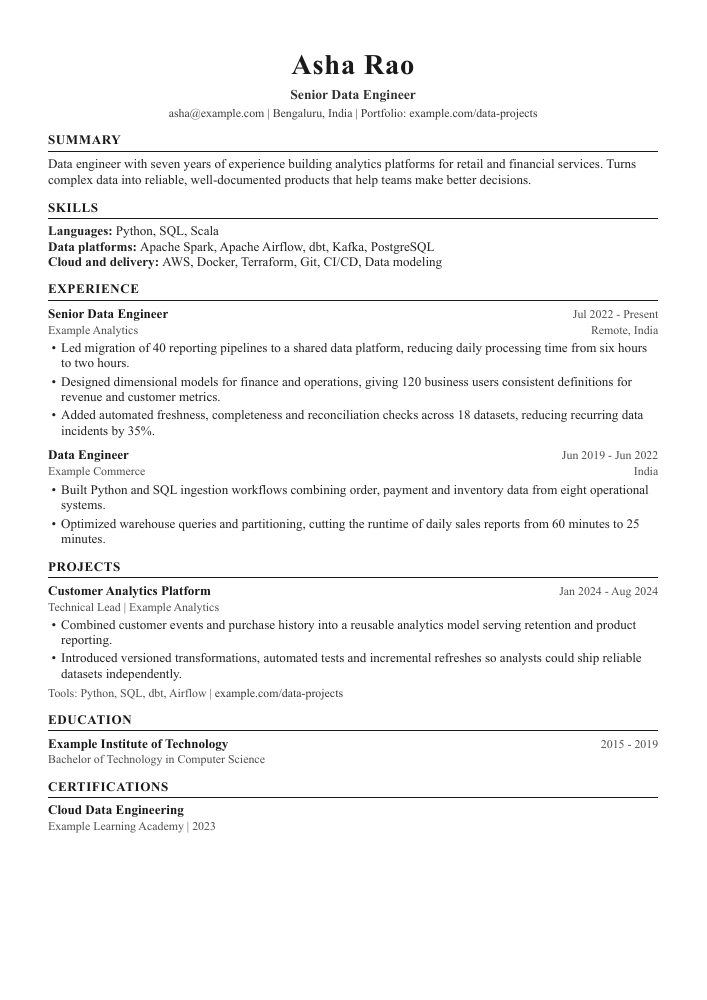
Traditional resumes sometimes use multiple columns, graphics, icons, complex tables, and decorative text boxes to create an attractive appearance. However, certain ATS platforms may struggle to interpret these elements correctly. Information can appear in the wrong order or become difficult to extract. A simple, single-column layout with clearly defined headings generally provides a more reliable structure for automated parsing.
An effective ATS-compatible resume should include relevant keywords from the job description. For example, a software developer applying for a position requiring Python, SQL, API development, and cloud computing should highlight the skills they genuinely possess. Including relevant terminology in the appropriate sections helps communicate professional suitability to both recruitment software and human reviewers.
However, adding keywords randomly is not an effective strategy. Every skill, qualification, certification, and achievement should accurately represent the candidate's background. A strong resume balances keyword relevance, readable formatting, and genuine professional experience.
Why Choose an ATS Friendly Resume Builder Free?
Creating a resume from scratch can be challenging, particularly when you are unfamiliar with professional resume formatting. An ATS friendly resume builder free simplifies this process by providing structured layouts and writing assistance. Instead of manually designing every section, candidates can concentrate on presenting their experience and qualifications clearly.
A dedicated resume builder also helps maintain consistency throughout the document. Headings, font styles, spacing, dates, and bullet points can follow a professional structure. This makes the resume easier to scan and improves the overall presentation of your career information.
Prepico provides several useful features, including single-column ATS templates, AI-assisted bullet point improvements, job description tailoring, and Word and PDF exports. Its guided editing approach also helps candidates review suggested changes rather than automatically accepting information that may not accurately describe their experience.
Another advantage is flexibility. You can maintain your main career profile and adapt relevant sections when applying for different positions. This reduces repetitive editing while helping you prepare resumes that reflect the requirements of individual job opportunities.
Important Features to Look for in an ATS Resume Builder
Choosing the right resume creation platform involves more than selecting an attractive design. The most important consideration is whether the resulting document is readable, organised, editable, and suitable for the application process.
A good ATS friendly resume builder free should provide a clean single-column structure, standard section headings, readable typography, and consistent spacing. It should also support commonly accepted file formats, particularly Microsoft Word and PDF, because employers may specify different submission requirements.
AI-assisted writing is another useful feature. It can help transform basic descriptions into clearer, achievement-focused statements. For example, instead of writing that you were responsible for managing customer enquiries, you could describe how you handled customer queries, resolved service issues, and maintained communication records. Any measurable results should come from your actual experience.
Job description analysis can further improve resume relevance. By comparing your existing skills and experience with a target vacancy, you can identify missing keywords and areas that need improvement without adding qualifications you do not possess.
| Resume Template | Suitable For | Important Features |
|---|---|---|
| Classic Professional | Experienced professionals | Traditional headings and clean formatting |
| Modern Single-Column | Corporate and business roles | Clear sections and readable typography |
| Technical Resume | IT and engineering professionals | Skills, projects, and technical experience |
| Fresher Resume | Students and graduates | Education, internships, and projects |
| Executive Resume | Senior-level professionals | Leadership experience and measurable achievements |
ATS-Friendly Resume Templates Word: What Should You Choose?
Many job seekers prefer ATS friendly resume templates Word because Microsoft Word documents are easy to edit, update, and share. Word format is particularly useful when employers request DOCX files or when you need to customise your resume for multiple job applications.
However, not every Word template is ATS-compatible. Some visually attractive designs contain sidebars, complicated tables, floating text boxes, and graphics that may affect how certain recruitment systems extract information. A professional Word resume should prioritise content organisation and readability over unnecessary decorative elements.
Consider these common resume styles when selecting a template:
Resume Template
Suitable For
Important Features
Classic Professional
Experienced professionals
Traditional headings and clean formatting
Modern Single-Column
Corporate and business roles
Clear sections and readable typography
Technical Resume
IT and engineering professionals
Skills, projects, and technical experience
Fresher Resume
Students and graduates
Education, internships, and projects
Executive Resume
Senior-level professionals
Leadership experience and measurable achievements
Prepico offers multiple ATS-focused templates designed for different professional profiles. Its templates follow single-column formatting principles and support downloadable Word and PDF versions. This makes it easier to choose a suitable layout without compromising the organisation of important career information.
Explore the available options at https://prepico.ai/resume-builder.
Understanding the Naukri ATS Resume Format
The Naukri ATS resume format is an important consideration for Indian job seekers who apply for opportunities through online recruitment platforms. Candidates should understand that there is no single universally guaranteed Naukri resume format. The most practical approach is to prepare a clean, professionally structured resume that allows recruitment systems to identify relevant information.
Start with your full name and professional contact details. Add a concise professional summary that communicates your experience, core strengths, and career objectives. Follow this with clearly labelled sections for technical skills, employment history, education, certifications, and relevant projects.
Candidates with work experience should prioritise their recent employment history and highlight responsibilities, contributions, and measurable achievements. Freshers can focus on academic qualifications, internships, personal projects, technical knowledge, and relevant certifications.
Keep the document simple and avoid unnecessary photographs, decorative graphics, multiple columns, and complex formatting. Use standard headings such as Professional Summary, Work Experience, Education, Skills, and Certifications. Before submitting your application, review the final document to ensure that all information is accurate and readable.
How to Create an ATS-Friendly Resume Using Prepico AI?
Creating a professional resume does not need to be a complicated process. Prepico AI provides a structured resume-building experience that helps candidates organise existing information and prepare a job-ready document.
Step 1: Import Your Existing Resume or Enter Your Details
Visit the Prepico AI Resume Builder and begin by uploading your existing Word or PDF resume, pasting your professional information, or entering details into the structured editor. The platform helps organise information into relevant career sections.
Step 2: Improve Your Professional Experience
Use the AI-assisted writing features to improve the clarity of your work experience and achievements. Strong action verbs and specific descriptions can make your responsibilities easier to understand. Where a measurable result would improve a statement, provide your actual figures instead of using invented statistics.
Step 3: Select an ATS-Friendly Template
Choose a suitable single-column template based on your professional background and target industry. Adjust formatting preferences, including margins, fonts, and date formats, while maintaining a consistent structure.
Step 4: Review and Download Your Resume
Carefully review your contact details, employment dates, education, skills, and achievements. Once everything is correct, download your resume in the required Word or PDF format. Prepico also provides JSON Resume export for candidates who want an additional standardised format.
Resume Writing Mistakes You Should Avoid
Even a professionally designed resume may become ineffective if it contains avoidable mistakes. One common problem is using the same generic resume for every job application. Different vacancies may require different skills, qualifications, and professional experience. Tailoring relevant sections to each position can make your application more focused.
Another mistake is including excessive information. Recruiters should be able to identify your professional background without reading lengthy paragraphs about unrelated responsibilities. Keep descriptions concise and prioritise information relevant to your target role.
Candidates should also avoid spelling mistakes, incorrect contact details, inconsistent employment dates, and unsupported achievements. Never include fake qualifications, invented experience, or skills you cannot demonstrate during an interview.
Finally, do not assume that an attractive design automatically means an ATS-compatible document. Always prioritise readable formatting, standard headings, and an appropriate file format. Reviewing your resume before submission can help prevent avoidable errors.
Create Your Professional Resume with Prepico AI Today
Your resume is often the first opportunity to communicate your professional value to a potential employer. A clear structure, relevant keywords, accurate achievements, and ATS-compatible formatting can help make that first impression more effective.
Whether you are a fresher preparing for your first interview, an experienced professional exploring new opportunities, or someone planning a career transition, an ATS friendly resume builder free can simplify the resume creation process. Choosing the right template and presenting your experience effectively can save time and make job applications more organised.
With Prepico AI, you can create a structured resume, improve professional descriptions, explore ATS-focused templates, and download your document in Word or PDF format.
Ready to Create an ATS-Friendly Resume in Minutes?
Join thousands of candidates who build job-winning, single-column resumes with Prepico. Export identical Microsoft Word and PDF files without hidden charges.
Frequently Asked Questions (FAQs)
An ATS-friendly resume builder free is an online tool that helps candidates create professionally structured resumes designed for easier processing by Applicant Tracking Systems. It generally provides standard layouts, organised sections, and formatting options.